Elementor je skvelý na navrhovanie dynamických layoutov, ale má jedno veľké obmedzenie:
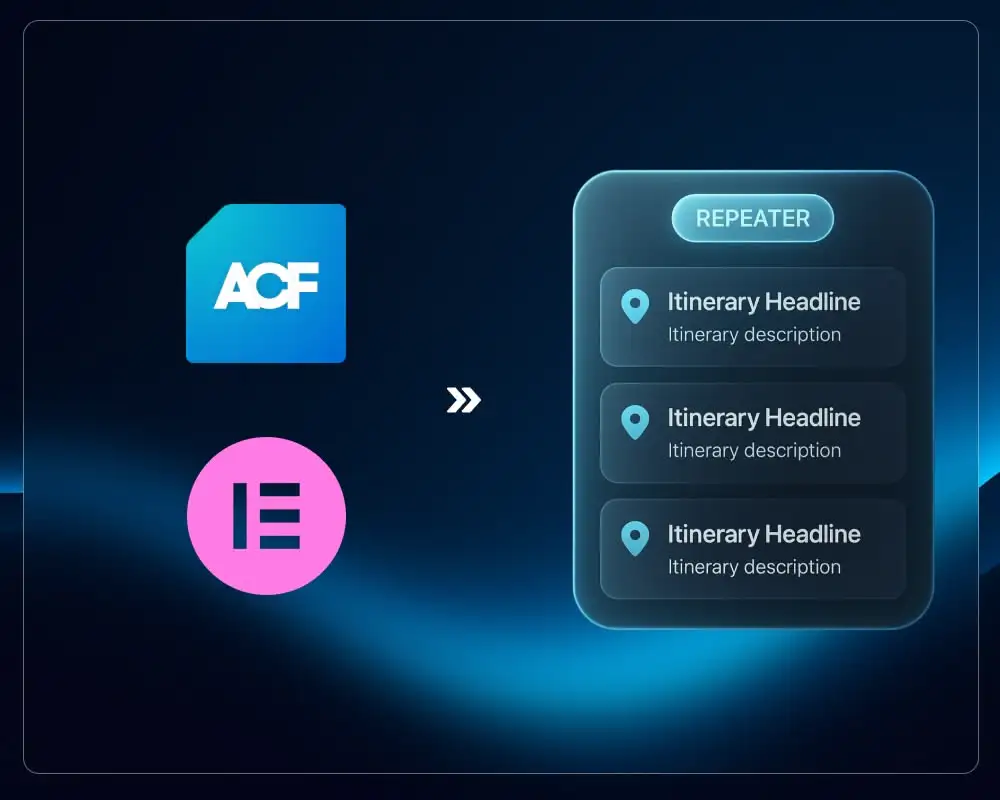
Elementor nedokáže natívne prechádzať riadky ACF Repeatera.
Widget Loop Grid funguje iba s príspevkami, CPT, termínmi alebo WP Queries, nie s riadkami repeatera.
Ak chcete zobraziť opakujúce sa položky ako:
- Itineráre zájazdov
- Tabuľky kapacít
- Zoznamy funkcií
- Časové osi
- Cenové rozpisy
- Riadky s ikonami a textom
...Elementor jednoducho nemá vstavaný repeater loop.
Tento návod ukazuje, ako to vyriešiť pomocou dvoch shortcodes:
1. Grid shortcode, ktorý prechádza každý riadok repeatera a vykreslí Elementor šablónu.
2. Field shortcode, ktorý vypíše konkrétnu hodnotu z aktuálneho riadku repeatera.
Spolu vám poskytnú plnú funkčnosť repeater → Elementor Loop Item.
Prečo túto techniku potrebujete
ACF Repeatery sú výborné na štruktúrované dáta, ale Elementor nevie sám prechádzať riadky repeatera.
S týmto systémom shortcodes získate:
- ACF repeater riadky vykreslené ako grid v Elementore
- Každý riadok zobrazený pomocou Elementor Loop Item šablóny
- Plnú kontrolu nad dizajnom v Elementore
- Podporu pre text, obrázky, ikony, dashicons, URL atď.
- Čisté, znovupoužiteľné riešenie bez pluginov
Tento prístup funguje pre akýkoľvek Custom Post Type s ACF.
Krok 1: Vytvorte ACF Repeater na vašom Post Type
Príklad názvu repeatera: tour_itineraries
Vnútri môžete mať podpolia ako:
tour_itineraries_icontour_itineraries_headlinetour_itineraries_description
Môžete použiť akúkoľvek štruktúru pomenovania. Názov repeatera sa len musí zhodovať s tým, čo uvediete v grid shortcode.
Krok 2: Vytvorte Elementor Loop Item šablónu
Táto šablóna definuje, ako vyzerá jeden riadok repeatera.
Vo vnútri šablóny vložíte textové alebo ikony widgety a nahradíte ich obsah shortcodes ako:
[tour_itinerary_field key="tour_itineraries_headline"]
[tour_itinerary_field key="tour_itineraries_description"]
[tour_itinerary_field key="tour_itineraries_icon" type="dashicon"]
Každý shortcode získa dáta z aktuálneho riadku repeatera.
Šablónu môžete štylizovať s plnými Elementor ovládacími prvkami: typografia, medzery, ikony, pozadia, pohybové efekty, všetko.
Krok 3: Vykreslite Repeater ako grid
Na vašej front-end stránke (alebo Elementor layoute) vložte:
[tour_itineraries_grid template_id="123"]
Kde:
tour_itineraries_gridje shortcodetemplate_idje ID Elementor Loop Item šablóny
Výstupom je:
- Grid wrapper
- Jedna inštancia šablóny pre každý riadok repeatera
Výsledok: Elementor sa stáva plným rendererom repeaterov.
Grid Shortcode (prechádzanie riadkov repeatera)
Toto je shortcode, ktorý prechádza riadky repeatera a vykreslí šablónu.
// Grid Shortcode
// Usage:
// [tour_itineraries_grid template_id="123"]
// [tour_itineraries_grid template_id="123" field="tour_itineraries"]
function tour_itineraries_grid_shortcode( $atts ) {
    $atts = shortcode_atts([
        'template_id' => '',
        'field'       => 'tour_itineraries', // default repeater name
    ], $atts, 'tour_itineraries_grid');

    $template_id = intval($atts['template_id']);
    if (!$template_id) return '';

    if (!function_exists('get_field')) return '';

    $rows = get_field($atts['field'], get_the_ID());
    if (!is_array($rows) || empty($rows)) return '';

    global $tour_itineraries_current_row;

    $out = '<div class="tour-itineraries-grid">';

    foreach ($rows as $row) {
        $tour_itineraries_current_row = $row;

        $out .= '<div class="tour-itineraries-grid-item">';
        $out .= do_shortcode('[elementor-template id="' . $template_id . '"]');
        $out .= '</div>';
    }

    $out .= '</div>';

    $tour_itineraries_current_row = null;

    return $out;
}
add_shortcode('tour_itineraries_grid', 'tour_itineraries_grid_shortcode');
Field Shortcode (výstup dát z každého riadku)
Tento shortcode vypíše jednotlivé polia z aktuálneho riadku repeatera.
// Field Shortcode
// Usage inside Elementor Template:
// [tour_itinerary_field key="tour_itineraries_headline"]
// [tour_itinerary_field key="tour_itineraries_description"]
// [tour_itinerary_field key="tour_itineraries_icon" type="dashicon"]
function tour_itinerary_field_shortcode( $atts ) {
    global $tour_itineraries_current_row;

    $atts = shortcode_atts([
        'key'  => '',
        'esc'  => 'html',
        'type' => 'auto', // auto | dashicon
    ], $atts, 'tour_itinerary_field');

    if (empty($atts['key']) || !is_array($tour_itineraries_current_row)) return '';

    $value = $tour_itineraries_current_row[$atts['key']] ?? '';

    if (is_array($value)) {
        if (isset($value['url'])) $value = $value['url'];
        elseif (isset($value['ID'])) $value = wp_get_attachment_url($value['ID']);
        else $value = '';
    }

    if ($atts['type'] === 'dashicon') {
        if (!is_string($value) || $value === '') return '';

        $class = strpos($value, 'dashicons') === false
            ? 'dashicons ' . trim($value)
            : 'dashicons ' . trim($value);

        return '<span class="' . esc_attr($class) . '"></span>';
    }

    if ($atts['esc'] === 'attr') return esc_attr($value);
    if ($atts['esc'] === 'html') return esc_html($value);

    return $value;
}
add_shortcode('tour_itinerary_field', 'tour_itinerary_field_shortcode');
Rozbor kódu: Ako shortcodes fungujú
1. Globálna premenná "aktuálny riadok"
Oba shortcodes zdieľajú globálnu premennú:
global $tour_itineraries_current_row;
- Grid shortcode nastaví túto premennú na aktuálny riadok repeatera vo vnútri cyklu.
- Field shortcode číta z tejto premennej, keď zavoláte
[tour_itinerary_field].
Práve toto sprístupňuje "aktuálny riadok" vo vašej Elementor Loop Item šablóne.
2. Grid shortcode: premena riadkov na cyklus
Kľúčové časti grid shortcode:
$rows = get_field($atts['field'], get_the_ID());
...
foreach ($rows as $row) {
    $tour_itineraries_current_row = $row;
    $out .= do_shortcode('[elementor-template id="' . $template_id . '"]');
}
get_field()načíta celý repeater z ACF ako PHP pole.foreach ($rows as $row)prechádza každý riadok.- Pri každej iterácii sa
$tour_itineraries_current_rowstáva aktuálnym riadkom. do_shortcode('[elementor-template ...]')vykreslí vašu Elementor Loop Item šablónu raz pre každý riadok.
Ak chcete tento vzor znova použiť pre iný repeater (napr. venues_capacity), môžete:
- zduplikovať funkciu shortcode,
- zmeniť názov shortcode,
- zmeniť predvolenú hodnotu
fielda názov globálnej premennej.
3. Field shortcode: čítanie hodnoty z riadku
Základná logika:
$value = $tour_itineraries_current_row[$atts['key']] ?? '';
Čokoľvek zadáte ako key="..." sa stáva indexom poľa. Takže:
[tour_itinerary_field key="tour_itineraries_headline"]
...číta:
$tour_itineraries_current_row['tour_itineraries_headline'];
Ak je ACF podpole obrázok alebo odkaz (pole), shortcode sa ho pokúsi previesť na URL:
if (is_array($value)) {
    if (isset($value['url'])) $value = $value['url'];
    elseif (isset($value['ID'])) $value = wp_get_attachment_url($value['ID']);
    else $value = '';
}
To znamená, že ho už môžete použiť pre zdroje obrázkov alebo URL pozadí.
4. Typy výstupu a escapovanie
Shortcode podporuje:
esc="html"(predvolené) → bezpečné pre textové uzlyesc="attr"→ bezpečné vo vnútri atribútovesc="none"→ bez escapovania (iba ak obsahu dôverujete)
A špeciálny režim type="dashicon":
[tour_itinerary_field key="tour_itineraries_icon" type="dashicon"]
Tento očakáva reťazec ako dashicons-location a vykreslí:
<span class="dashicons dashicons-location"></span>
Jednoducho môžete pridať nové typy, ak potrebujete vlastný výstup.
5. Ako pridať nové pole (jednoduchý prípad)
Ak chcete vypísať iba ďalšie ACF podpole z rovnakého riadku repeatera, nemusíte vôbec meniť PHP.
- Pridajte nové podpole v ACF, napr.
tour_itineraries_duration. - Vo vašej Elementor šablóne použite:
[tour_itinerary_field key="tour_itineraries_duration"]
To je všetko. Shortcode automaticky prečíta nový kľúč poľa z aktuálneho riadku.
6. Ako pridať nový typ výstupu (pokročilé)
Ak chcete vlastný režim vykresľovania (napríklad <img> tag namiesto samotného URL), môžete rozšíriť prepínač type.
Príklad: pridanie podpory type="image".
// After resolving $value
if ($atts['type'] === 'image') {
    if (!$value) return '';
    return '<img src="' . esc_url($value) . '" alt="" loading="lazy" />';
}
Použitie v Elementore:
[tour_itinerary_field key="tour_itineraries_image" type="image"]
Tento vzor vám umožňuje postupne pridávať ďalšie špecializované typy výstupu podľa potrieb vášho projektu.
Príklad kompletného postupu
1. Pridajte ACF Repeater na váš CPT
Pomenujte ho tour_itineraries.
2. Pridajte podpolia
- icon
- headline
- description
3. Vytvorte Loop Item šablónu v Elementore
Vložte:
[tour_itinerary_field key="tour_itineraries_icon" type="dashicon"]
[tour_itinerary_field key="tour_itineraries_headline"]
[tour_itinerary_field key="tour_itineraries_description"]
4. Zobrazte grid
Umiestnite toto na stránku:
[tour_itineraries_grid template_id="123"]
Hotovo. Teraz máte plne dynamický grid poháňaný repeaterom v Elementore.
Záver
Elementor natívne nepodporuje prechádzanie riadkov ACF repeatera, ale s dvomi jednoduchými shortcodes môžete odomknúť kompletné vykresľovanie repeaterov pomocou Elementor šablón.
Táto metóda je:
- priateľská pre vývojárov
- priateľská pre dizajnérov (úprava layoutu v Elementore)
- rýchla
- stabilná
- bez pluginov
Tento vzor môžete prispôsobiť pre akýkoľvek ACF repeater vo vašich WordPress projektoch, čím získate úplnú kontrolu nad zobrazením dát repeatera pri zachovaní plných dizajnových možností Elementora.
Ak potrebujete pomoc s Elementor šablónami alebo WordPress vývojom, pozrite si moje služby Elementor vývoja a WordPress vývoja. Súvisiacu tému nájdete aj v návode na vlastný štýlovaný dropdown vo WordPress a Elementore.