Migrácia WordPress blogu so stovkami alebo tisíckami článkov nikdy nie je obyčajné kopírovanie. Aj keď obsah dorazí čistý, jeden problém sa objaví takmer zakaždým: Featured Images sú v neporiadku.
Nedávno som na to narazil pri veľkej migrácii blogu. Stará téma bola vytvorená pred rokmi, v čase, keď Featured Images boli druhoradé. Redaktori pracovali s tým, čo mali:
- Na niektorých článkoch nastavili správny Featured Image cez post meta.
- Na iných, pretože stará téma nezobrazovala thumbnaily, jednoducho vložili obrázok ako prvý element do obsahu článku.
Oba prístupy fungovali na starom webe bez problémov. Na novej téme? Úplný chaos.
Dva problémy, ktoré to spôsobuje
1. Duplicitné hero obrázky
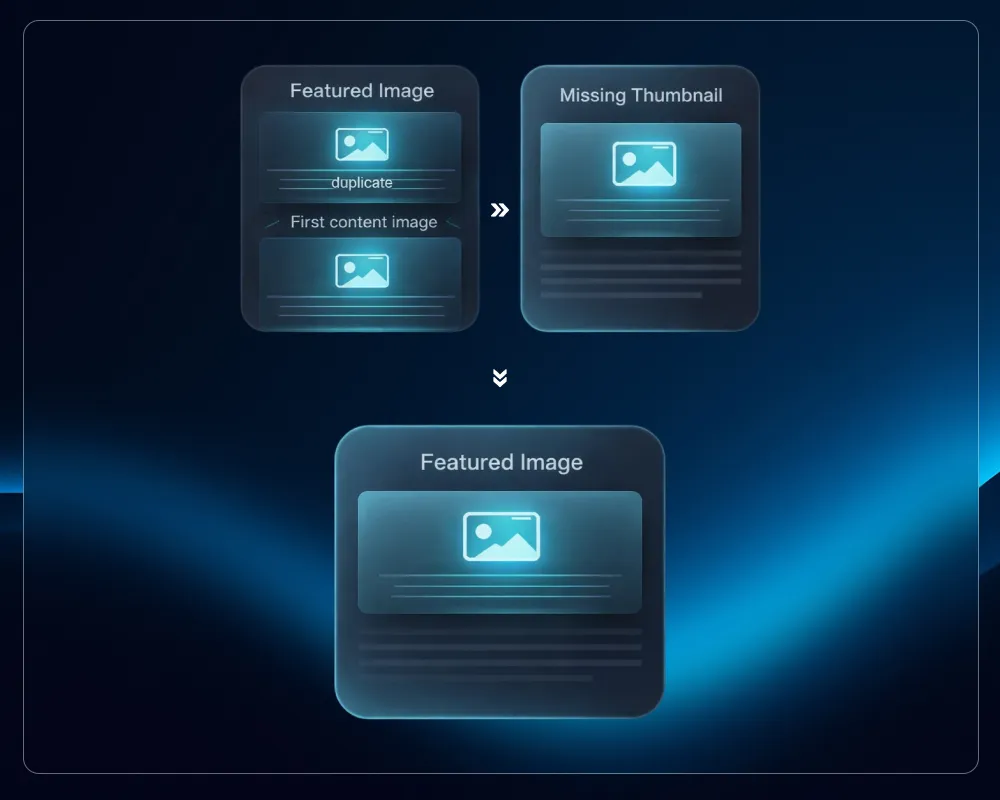
Ak má článok aj Featured Image aj ten istý obrázok ako prvý <img> tag v obsahu, moderné témy vykreslia obidva. Rovnaká fotka sa zobrazí dvakrát na vrchu článku: raz v hero bloku témy, raz v renderovanom obsahu.
2. Nefunkčné karty archívu a SEO thumbnaily
Ak článok nemá Featured Image (pretože redaktor sa spoliehal na inline umiestnenie), archív blogu, náhľady pri zdieľaní na sociálnych sieťach, SEO pluginy ako Yoast alebo RankMath a moduly súvisiacich článkov zostanú prázdne. Žiadny thumbnail. Len šedý placeholder, alebo ešte horšie, nič.
Oprava znie jednoducho: prejsť každý článok, nastaviť Featured Image ak chýba a odstrániť duplikát ak už existuje. V praxi to robiť manuálne cez wp-admin na 3 000 článkoch nie je reálne.
Prečo hromadné pluginy tu nestačia
Existuje niekoľko WordPress pluginov, ktoré riešia podobné problémy (Auto Post Thumbnail, Bulk Featured Image, Regenerate Thumbnails), ale žiadny z nich nevyrieši túto konkrétnu kombináciu čisto.
Medzery sú reálne:
- Žiadny dry-run režim, takže pracujete naslepo
- Žiadna logika porovnávania, takže môžu omylom odstrániť legitímne inline obrázky
- Žiadny batch offset, takže na veľkých datasetoch vypršia časový limit
- Bežia cez wp-admin, čo znamená PHP timeouty na veľkých weboch
- Nedokážu preskočiť pluginy a témy počas behu, čo spôsobuje zaseknutia
Pre migračnú úlohu potrebujete niečo, čo môžete spustiť v termináli, najprv skontrolovať a v prípade potreby vrátiť späť. To je WP-CLI.
Riešenie: WP-CLI príkaz ako MU Plugin
Príkaz nižšie rieši oba problémy s jasnou sadou pravidiel:
Prípad A: Featured Image už existuje.
Ak prvý <img> v obsahu zodpovedá URL Featured Image, odstráni ho z obsahu. Nezhoduje sa? Nechá ho na mieste. Žiadne náhodné odstránenia.
Prípad B: Featured Image chýba.
Nájde prvý <img> v obsahu, stiahne ho do Media Library ak je to potrebné, nastaví ho ako Featured Image a potom ho odstráni z obsahu, aby sa predišlo budúcej duplikácii.
Kód žije v MU plugine (must-use plugin), čo znamená, že sa načíta automaticky bez aktivácie, dokonca aj keď spustíte WP-CLI s --skip-plugins --skip-themes.
Inštalácia
Vytvorte nový súbor na ceste:
wp-content/mu-plugins/featured-image-migrator.php
Potom vložte kompletný kód nižšie.
Kompletný kód
<?php
/**
* Plugin Name: Featured Image Migrator (WP-CLI)
* Description: WP-CLI command to deduplicate first content image vs featured image,
* and backfill missing featured images from first content image.
* Author: Milan Pavlak
* Version: 1.0.0
*/
if (!defined('ABSPATH')) {
exit;
}
if (!defined('WP_CLI') || !WP_CLI) {
return;
}
class Featured_Image_Migrator_Command {
private $stats = [
'set_featured' => 0,
'removed_first_img' => 0,
'skipped_removal_not_matching' => 0,
'no_first_img' => 0,
'sideload_failed' => 0,
];
/**
* Deduplicate and backfill featured images across posts.
*
* ## OPTIONS
*
* [--ids=<ids>]
* : Comma-separated list of post IDs to process.
*
* [--limit=<n>]
* : Number of posts to process (default: 200).
*
* [--offset=<n>]
* : Offset for pagination (default: 0).
*
* [--dry-run]
* : Preview changes without writing anything.
*
* [--remove-first-image]
* : Remove the first image from content after moving it to featured.
*
* [--remove-only-if-matches]
* : When featured exists, only remove the first content image if it matches the featured URL.
*
* [--status=<status>]
* : Post statuses to include (default: publish). Example: publish,draft
*/
public function __invoke($args, $assoc_args) {
$dry_run = !empty($assoc_args['dry-run']);
$remove_first_image = !empty($assoc_args['remove-first-image']);
$remove_only_if_matches = !empty($assoc_args['remove-only-if-matches']);
$limit = isset($assoc_args['limit']) ? max(1, (int)$assoc_args['limit']) : 200;
$offset = isset($assoc_args['offset']) ? max(0, (int)$assoc_args['offset']) : 0;
$status = isset($assoc_args['status']) ? trim((string)$assoc_args['status']) : 'publish';
$statuses = array_filter(array_map('trim', explode(',', $status)));
$ids = [];
if (!empty($assoc_args['ids'])) {
$ids = array_filter(array_map('intval', explode(',', (string)$assoc_args['ids'])));
}
$q_args = [
'post_type' => 'post',
'post_status' => $statuses ?: ['publish'],
'fields' => 'ids',
'orderby' => 'ID',
'order' => 'ASC',
'posts_per_page' => $limit,
'offset' => $offset,
'no_found_rows' => true,
];
if (!empty($ids)) {
$q_args['post__in'] = $ids;
$q_args['posts_per_page'] = count($ids);
$q_args['offset'] = 0;
$q_args['orderby'] = 'post__in';
}
$query = new WP_Query($q_args);
$post_ids = $query->posts;
WP_CLI::log("Processing " . count($post_ids) . " posts. dry-run=" . ($dry_run ? 'yes' : 'no'));
foreach ($post_ids as $post_id) {
$this->process_post((int)$post_id, $dry_run, $remove_first_image, $remove_only_if_matches);
}
WP_CLI::log("---- STATS ----");
foreach ($this->stats as $k => $v) {
WP_CLI::log("$k: $v");
}
WP_CLI::success("Done.");
}
private function process_post(int $post_id, bool $dry_run, bool $remove_first_image, bool $remove_only_if_matches): void {
$post = get_post($post_id);
if (!$post || empty($post->post_content)) {
$this->stats['no_first_img']++;
return;
}
$content = (string)$post->post_content;
$first = $this->extract_first_image($content);
if (!$first) {
$this->stats['no_first_img']++;
return;
}
$first_src = $first['src'];
$first_snippet = $first['snippet'];
$featured_id = get_post_thumbnail_id($post_id);
// Case A: Featured image already exists
if ($featured_id) {
if (!$remove_first_image) {
return;
}
$featured_url = wp_get_attachment_url($featured_id);
if (!$featured_url) {
return;
}
if ($remove_only_if_matches) {
if (!$this->urls_match_strict($first_src, $featured_url)) {
$this->stats['skipped_removal_not_matching']++;
WP_CLI::log("Post {$post_id}: featured exists but first image does NOT match, skipping.");
return;
}
}
if ($dry_run) {
WP_CLI::log("Post {$post_id}: [DRY RUN] would remove first image (src={$first_src})");
$this->stats['removed_first_img']++;
return;
}
$new_content = $this->remove_first_image_snippet($content, $first_snippet);
if ($new_content !== $content) {
wp_update_post(['ID' => $post_id, 'post_content' => $new_content]);
$this->stats['removed_first_img']++;
}
return;
}
// Case B: No featured image - promote first content image
$attachment_id = $this->ensure_attachment_from_url($first_src, $post_id, $dry_run);
if (!$attachment_id) {
$this->stats['sideload_failed']++;
WP_CLI::log("Post {$post_id}: sideload failed (src={$first_src})");
return;
}
if ($dry_run) {
WP_CLI::log("Post {$post_id}: [DRY RUN] would set featured => attachment {$attachment_id}");
if ($remove_first_image) {
WP_CLI::log("Post {$post_id}: [DRY RUN] would remove first image from content.");
}
$this->stats['set_featured']++;
if ($remove_first_image) $this->stats['removed_first_img']++;
return;
}
set_post_thumbnail($post_id, $attachment_id);
$this->stats['set_featured']++;
if ($remove_first_image) {
$new_content = $this->remove_first_image_snippet($content, $first_snippet);
if ($new_content !== $content) {
wp_update_post(['ID' => $post_id, 'post_content' => $new_content]);
$this->stats['removed_first_img']++;
}
}
}
/**
* Extract the first <img> tag and its surrounding <p> wrapper if present.
*/
private function extract_first_image(string $html): ?array {
if (!preg_match('/<img\b[^>]*\bsrc\s*=\s*(["\'])(.*?)\1[^>]*>/i', $html, $m, PREG_OFFSET_CAPTURE)) {
return null;
}
$img_tag = $m[0][0];
$img_pos = $m[0][1];
$src = $m[2][0];
$snippet = $img_tag;
$before = substr($html, 0, $img_pos);
$p_open_pos = strripos($before, '<p');
if ($p_open_pos !== false) {
$after_from_p = substr($html, $p_open_pos);
$p_close_pos = stripos($after_from_p, '</p>');
if ($p_close_pos !== false) {
$p_block = substr($after_from_p, 0, $p_close_pos + 4);
if (stripos($p_block, $img_tag) !== false) {
$snippet = $p_block;
}
}
}
return ['src' => $src, 'snippet' => $snippet];
}
private function remove_first_image_snippet(string $content, string $snippet): string {
$pos = strpos($content, $snippet);
if ($pos === false) {
$content2 = preg_replace('/<img\b[^>]*\bsrc\s*=\s*(["\'])(.*?)\1[^>]*>/i', '', $content, 1);
return is_string($content2) ? $this->cleanup_html($content2) : $content;
}
$new = substr($content, 0, $pos) . substr($content, $pos + strlen($snippet));
return $this->cleanup_html($new);
}
private function cleanup_html(string $html): string {
$html = preg_replace('/<p>\s*(?: |\xC2\xA0)?\s*<\/p>/i', '', $html);
return trim($html);
}
/**
* Normalize and compare two image URLs.
* Strips query strings and WordPress size suffixes (-300x200) before comparing.
*/
private function urls_match_strict(string $a, string $b): bool {
return $this->normalize_img_url($a) === $this->normalize_img_url($b);
}
private function normalize_img_url(string $url): string {
$url = preg_replace('/\?.*$/', '', $url);
$url = preg_replace('/-\d+x\d+(?=\.\w+$)/', '', $url);
return strtolower($url);
}
/**
* Return an attachment ID for a URL.
* Tries to find it in the Media Library first. Sideloads only if necessary.
*/
private function ensure_attachment_from_url(string $url, int $post_id, bool $dry_run): int {
$url = trim($url);
if ($url === '') return 0;
$maybe_id = attachment_url_to_postid($url);
if ($maybe_id) return (int)$maybe_id;
if ($dry_run) return 1;
if (!function_exists('media_sideload_image')) {
require_once ABSPATH . 'wp-admin/includes/media.php';
require_once ABSPATH . 'wp-admin/includes/file.php';
require_once ABSPATH . 'wp-admin/includes/image.php';
}
$result = media_sideload_image($url, $post_id, null, 'id');
if (is_wp_error($result)) return 0;
$id = (int)$result;
return $id > 0 ? $id : 0;
}
}
WP_CLI::add_command('featured-migrator', 'Featured_Image_Migrator_Command');
Použitie
Krok 1: Najprv vždy spustite dry-run
Otestujte na niekoľkých konkrétnych článkoch predtým, než sa čohokoľvek dotknete:
php /home/wp-cli.phar --path=/path/to/wp --skip-plugins --skip-themes \
  featured-migrator --ids=101,202,303 --dry-run --remove-first-image --remove-only-if-matches
Pozorne si prečítajte výstup. Overte, že logika zodpovedá vašim očakávaniam.
Krok 2: Spustite naostro na testovacích článkoch
php /home/wp-cli.phar --path=/path/to/wp --skip-plugins --skip-themes \
  featured-migrator --ids=101,202,303 --remove-first-image --remove-only-if-matches
Krok 3: Spracujte celý web v dávkach
Na zdieľanom hostingu sa vyhnite spracovaniu tisícok článkov naraz. Použite --limit a --offset na stránkovanie:
# Dávka 1
php /home/wp-cli.phar --path=/path/to/wp --skip-plugins --skip-themes \
  featured-migrator --limit=200 --offset=0 --remove-first-image --remove-only-if-matches

# Dávka 2
php /home/wp-cli.phar --path=/path/to/wp --skip-plugins --skip-themes \
  featured-migrator --limit=200 --offset=200 --remove-first-image --remove-only-if-matches

# Pokračujte zvyšovaním --offset o 200 až do konca
Na konci každého behu príkaz vypíše súhrn štatistík:
---- STATS ----
set_featured: 47
removed_first_img: 112
skipped_removal_not_matching: 8
no_first_img: 33
sideload_failed: 2
Ako funguje inteligentné porovnávanie
Jeden z nenápadnejších problémov skriptov typu "odstráň prvý obrázok" sú falošné pozitíva. Článok môže mať nastavený Featured Image a zároveň úplne iný, legitímny obrázok ako prvý element v tele článku (infografiku, diagram, graf). Ten nechcete odstrániť.
Príznak --remove-only-if-matches toto rieši. Pred akýmkoľvek odstránením príkaz:
- Získa URL Featured Image z Media Library
- Normalizuje obe URL: odstráni query stringy, odstráni WordPress prípony veľkostí ako
-768x512 - Porovná ich bez ohľadu na veľkosť písmen
Len ak sa zhodujú, prvý obrázok z obsahu sa odstráni. V opačnom prípade sa článok ponechá nedotknutý a zaráta sa do skipped_removal_not_matching, takže ho môžete skontrolovať.
Časté problémy a ich riešenia
WP-CLI sa zasekne alebo vyprší časový limit
Zvyčajne to znamená, že plugin alebo téma spúšťa náročnú logiku počas štartu: externé API volania, veľké query, pomalé init hooky.
Riešenie: vždy spúšťajte s --skip-plugins --skip-themes. Umiestnenie ako MU plugin zabezpečí, že sa váš príkaz načíta aj tak.
Zlyhania sideloadu
Štatistika sideload_failed pokrýva:
- Nefunkčné URL obrázkov zostávajúce zo starého hostingu
- Odpovede 403/404 (hotlink ochrana na starej doméne)
- URL, ktoré nie sú obrázky, omylom v
srcatribútoch - Súbory, ktoré boli vymazané pred migráciou alebo počas nej
Pre veľký web zvážte rozšírenie príkazu o príznak --csv-report, ktorý exportuje zoznam problémových post ID a URL na manuálnu kontrolu.
Gutenberg bloky
Aktuálny regex cieli na klasické <img> tagy v surovom post_content. Ak vaše migrované články obsahujú Gutenberg block markup (<!-- wp:image -->), logiku je potrebné upraviť tak, aby namiesto toho parsovala block atribúty. Toto je užitočné rozšírenie pre každý web, ktorý používal block editor ešte pred migráciou.
Prečo MU Plugin a nie samostatný skript
Technicky by ste toto mohli napísať ako samostatný PHP súbor a načítať ho cez --require. Prístup cez MU plugin je čistejší z niekoľkých dôvodov:
- Je vždy dostupný, bez potreby pamätať si argument s cestou k súboru pri každom spustení
- Načíta sa pred pluginmi a témami, čím sa vyhnete konfliktom
- Je verzionovaný spolu s vaším webom
- Po dokončení migrácie jednoducho súbor zmažete
Záver
Migrácia WordPressu nekončí, keď obsah dorazí do databázy. Práca na tom, aby sa dekáda nekonzistentných redakčných návykov správala korektne pod novou témou, je miesto, kde ide skutočný čas. A Featured Images sú jedným z najviditeľnejších miest, kde sa to pokazí.
Tento príkaz vám dáva bezpečný, auditovateľný a dávkovo spracovateľný spôsob, ako opraviť obe strany problému jedným prechodom. Najprv dry-run, skontrolujte štatistiky, spracujte v dávkach a vaše karty archívu aj hlavičky článkov budú konzistentné naprieč celým blogom.
Kód je otestovaný v produkcii a zámerne konzervatívny. Keď niečo vyzerá nejednoznačne, radšej preskočí ako hádá.
Ak pracujete na migrácii WordPressu a narazíte na okrajové prípady, ktoré toto nepokrýva, pokojne sa ozvite. Pomoc s migráciami a ďalšími úlohami nájdete v mojich službách WordPress vývoja.