Ak prevádzkujete Facebook alebo Instagram reklamy a spoliehate sa výlučne na Meta Pixel v prehliadači, prichádzate o dáta. A pravdepodobne ani neviete, koľko.
Ad blockery. Obmedzenia súkromia v iOS. ITP v prehliadačoch. Toto všetko potichu zahodí časť vašich konverzných udalostí ešte predtým, než sa dostanú k Meta. Výsledok: vaše kampane sa optimalizujú na neúplných dátach, vykazovaný ROAS vyzerá horšie ako v skutočnosti a potenciálne škálujete nesprávne ad sety.
Riešením je Conversions API (CAPI), server-side kanál, ktorý odosiela udalosti priamo z vášho servera do Meta a úplne obchádza prehliadač. V kombinácii s Meta Pixel v prehliadači získate maximálne pokrytie z oboch strán.
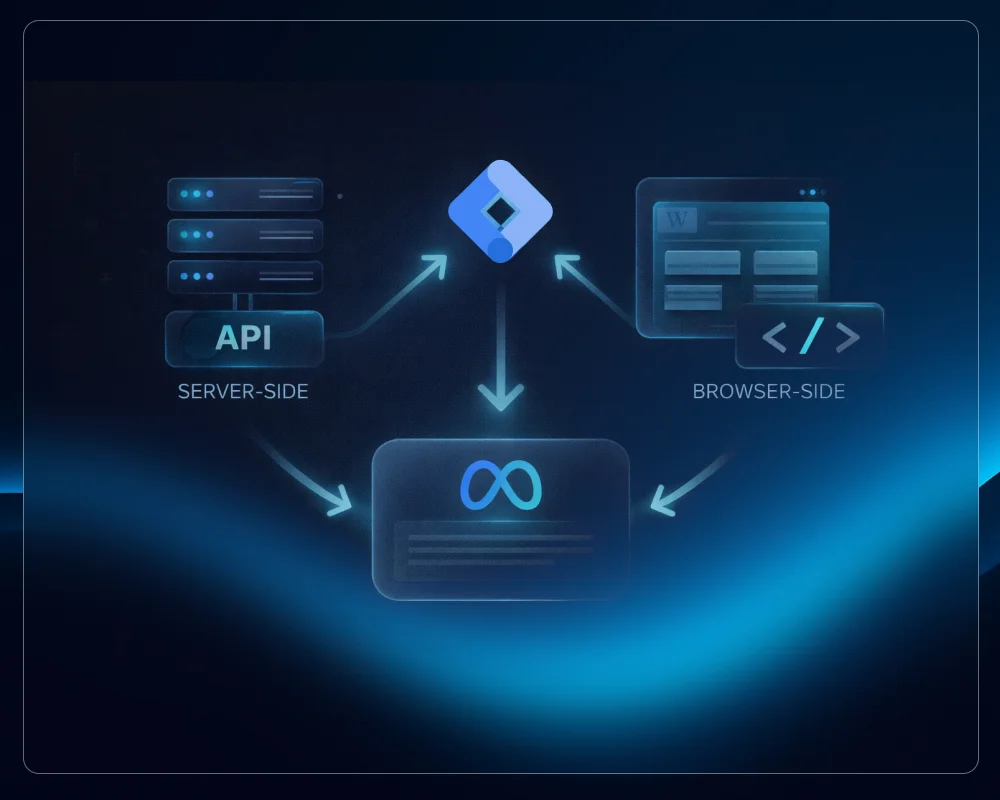
Tento návod pokrýva kompletnú hybridnú implementáciu pre WordPress: udalosti v prehliadači cez GTM, serverové udalosti cez PHP v functions.php a systém deduplication, ktorý zabezpečí, že Meta započíta každú konverziu iba raz.
Prečo hybridný prístup? Prečo nie iba jeden alebo druhý?
Žiadny kanál sám o sebe nestačí.
Iba prehliadač (Meta Pixel):
- Blokovaný ad blockermi a ITP vo Firefox/Safari
- Stráca dáta od používateľov, ktorí odmietli tracking
- Závislý na dostupnosti cookies
Iba server (CAPI):
- Neovplyvnený ad blockermi ani ITP
- Nemá však prístup k cookies prehliadača ako
_fbp(Meta browser fingerprint) - Nižšia Event Match Quality bez dát z cookies
Hybridný prístup (oba, s deduplication):
- Udalosti z prehliadača prinášajú dáta z cookies (
_fbp,_fbc) - Serverové udalosti zaručia doručenie, keď je prehliadač zablokovaný
- Deduplication cez zdieľaný
event_idzabezpečí, že Meta započíta každú udalosť iba raz
Toto je teraz odporúčaný prístup aj v dokumentácii Meta a presne toto nastavenie tento návod implementuje.
Architektúra systému
Implementácia má tri komponenty:
1. Meta Pixel cez GTM (strana prehliadača) GTM tagy sa spúšťajú pri načítaní stránky a odoslaní formulára. Odosielajú udalosti priamo z prehliadača návštevníka s úplným kontextom cookies.
2. Conversions API cez PHP (strana servera)
WordPress hooky odosielajú rovnaké udalosti zo servera pomocou wp_remote_post() do Meta Graph API. Funguje to aj vtedy, keď je Meta Pixel v prehliadači zablokovaný.
3. Deduplication
Oba kanály používajú rovnaký formát event_id zostavený zo session tokenu a page load ID. Meta porovnáva event_name + event_id a započíta udalosť iba raz, bez ohľadu na to, koľko kanálov ju nahlásilo.
Pokryté udalosti
| Udalosť | Spúšťač | Účel |
|---|---|---|
| PageView | Každá stránka | Sledovanie návštevnosti |
| ViewContent | Stránky služieb/produktov | Signál záujmu |
| Lead | Odoslanie formulára s ponukou | Primárna konverzia |
| Contact | Odoslanie kontaktného formulára | Konverzia |
| Subscribe | Odoslanie newsletterového formulára | Mikro konverzia |
| SubmitApplication | Odoslanie kariérneho formulára | Mikro konverzia |
Tento zoznam môžete upraviť podľa štruktúry vášho webu.
Krok 1: PHP nastavenie v functions.php
Celá server-side logika sa nachádza v súbore functions.php vašej témy. Je rozdelená do piatich sekcií.
Konfigurácia
Začnite s vašimi prihlasovacími údajmi. Nikdy neuchovávajte Access Token v kóde vo verejnom repozitári. V produkcii ho uložte cez premenné prostredia alebo definície vo wp-config.php.
// CONFIGURATION
define('META_PIXEL_ID',       'YOUR_PIXEL_ID');
define('META_ACCESS_TOKEN',   'YOUR_ACCESS_TOKEN');
define('META_API_VERSION',    'v22.0');
define('META_TEST_EVENT_CODE', ''); // Set to e.g. 'TEST1234' during testing only
Sekcia 1: Generátor session cookie
Tento hook sa spúšťa na init a vytvára cookie _fbevt, 32-znakový náhodný token, ktorý identifikuje reláciu. Používa sa ako súčasť každého event_id a ako hashovaný external_id pre matching používateľov.
add_action('init', function() {
    if (!isset($_COOKIE['_fbevt'])) {
        $token = bin2hex(random_bytes(16));
        setcookie('_fbevt', $token, time() + 3600, '/', '', true, false);
        $_COOKIE['_fbevt'] = $token;
    }
});
Sekcia 2: AJAX JavaScript Injector
Tento hook vkladá JavaScript do wp_footer. JS odosiela PageView (a ViewContent na stránkach služieb) na WordPress AJAX endpoint pri každom načítaní stránky, vrátane cachovaných stránok obsluhovaných WP Rocket.
add_action('wp_footer', function() {
    ?>
    <script>
    (function() {
        var evtToken = (document.cookie.match(/(?:^|; )_fbevt=([^;]*)/) || [])[1] || '';
        if (!evtToken) return;

        var pid = window._fbPageId || Math.random().toString(36).substr(2, 9);
        var pageUrl = window.location.href;
        var isServicePage = window.location.pathname.indexOf('/services/') !== -1;

        var xhr = new XMLHttpRequest();
        xhr.open('POST', '<?php echo admin_url("admin-ajax.php"); ?>', true);
        xhr.setRequestHeader('Content-Type', 'application/x-www-form-urlencoded');
        xhr.send(
            'action=meta_capi_event'
            + '&event_name=PageView'
            + '&event_id=PageView_' + evtToken + '_' + pid
            + '&page_url=' + encodeURIComponent(pageUrl)
            + '&page_title=' + encodeURIComponent(document.title)
        );

        if (isServicePage) {
            var xhr2 = new XMLHttpRequest();
            xhr2.open('POST', '<?php echo admin_url("admin-ajax.php"); ?>', true);
            xhr2.setRequestHeader('Content-Type', 'application/x-www-form-urlencoded');
            xhr2.send(
                'action=meta_capi_event'
                + '&event_name=ViewContent'
                + '&event_id=ViewContent_' + evtToken + '_' + pid
                + '&page_url=' + encodeURIComponent(pageUrl)
                + '&page_title=' + encodeURIComponent(document.title)
            );
        }
    })();
    </script>
    <?php
});
Poznámka: Aktualizujte cestu
/services/tak, aby zodpovedala štruktúre URL vášho webu.
Sekcia 3: AJAX Handler
Tento handler prijíma AJAX požiadavky zo Sekcie 2, validuje ich, filtruje botov a odosiela udalosť do Meta Graph API.
add_action('wp_ajax_meta_capi_event',        'meta_capi_ajax_handler');
add_action('wp_ajax_nopriv_meta_capi_event', 'meta_capi_ajax_handler');

function meta_capi_ajax_handler() {
    // Filter bots
    if (isset($_SERVER['HTTP_USER_AGENT']) &&
        preg_match('/bot|crawl|spider|slurp|googlebot/i', $_SERVER['HTTP_USER_AGENT'])) {
        wp_die();
    }

    $event_name  = sanitize_text_field($_POST['event_name']  ?? '');
    $event_id    = sanitize_text_field($_POST['event_id']    ?? '');
    $page_url    = esc_url_raw($_POST['page_url']            ?? '');
    $page_title  = sanitize_text_field($_POST['page_title']  ?? '');

    if (!$event_name || !$event_id) wp_die();
    if (!in_array($event_name, ['PageView', 'ViewContent'])) wp_die();

    $user_data  = meta_capi_get_user_data();
    $event_data = [
        'event_name'        => $event_name,
        'event_time'        => time(),
        'event_id'          => $event_id,
        'event_source_url'  => $page_url,
        'action_source'     => 'website',
        'user_data'         => $user_data,
    ];

    if ($event_name === 'ViewContent') {
        $event_data['custom_data'] = [
            'content_name'     => $page_title,
            'content_category' => 'services',
        ];
    }

    meta_capi_send_event($event_data);
    wp_die();
}
Sekcia 4: Elementor Form Hook
Tento hook sa spúšťa pri odoslaní formulára Elementor Pro. Mapuje ID formulárov na Meta udalosti, hashuje všetky osobné údaje pomocou SHA256 pred odoslaním a zostavuje event ID zo session cookies.
add_action('elementor_pro/forms/new_record', function($record, $handler) {
    $form_id = $record->get_form_settings('form_id')
             ?: $record->get_form_settings('id');

    // Map your Elementor form IDs to Meta events
    $form_event_map = [
        'YOUR_QUOTE_FORM_ID'   => 'Lead',
        'YOUR_CONTACT_FORM_ID' => 'Contact',
        'YOUR_NEWSLETTER_ID'   => 'Subscribe',
        'YOUR_CAREER_FORM_ID'  => 'SubmitApplication',
    ];

    $meta_event = null;
    foreach ($form_event_map as $fid => $event_name) {
        if (stripos($form_id, $fid) !== false || $form_id === $fid) {
            $meta_event = $event_name;
            break;
        }
    }

    if (!$meta_event) return;

    $raw_fields = $record->get('fields');
    $fields     = [];
    foreach ($raw_fields as $field) {
        $fields[$field['id']] = $field['value'];
    }

    $user_data = meta_capi_get_user_data();

    // Hash all PII with SHA256 before sending
    if (!empty($fields['email']))      $user_data['em'] = [hash('sha256', strtolower(trim($fields['email'])))];
    if (!empty($fields['phone']))      $user_data['ph'] = [hash('sha256', preg_replace('/[^0-9+]/', '', $fields['phone']))];
    if (!empty($fields['first_name'])) $user_data['fn'] = [hash('sha256', strtolower(trim($fields['first_name'])))];
    if (!empty($fields['last_name']))  $user_data['ln'] = [hash('sha256', strtolower(trim($fields['last_name'])))];
    if (!empty($fields['city']))       $user_data['ct'] = [hash('sha256', strtolower(trim($fields['city'])))];
    if (!empty($fields['zipcode']))    $user_data['zp'] = [hash('sha256', trim($fields['zipcode']))];

    $user_data['country'] = [hash('sha256', 'sk')]; // Update for your country

    // Build event_id from cookies (same format as GTM)
    $event_token = $_COOKIE['_fbevt'] ?? '';
    $page_id     = $_COOKIE['_fbpid'] ?? '';

    $event_id = $page_id
        ? $meta_event . '_' . $event_token . '_' . $page_id
        : $meta_event . '_' . $event_token . '_' . bin2hex(random_bytes(4));

    $content_names = [
        'Lead'              => 'Quote',
        'Contact'           => 'Contact',
        'Subscribe'         => 'Newsletter',
        'SubmitApplication' => 'Application',
    ];

    $event_data = [
        'event_name'       => $meta_event,
        'event_time'       => time(),
        'event_id'         => $event_id,
        'event_source_url' => wp_get_referer() ?: home_url(),
        'action_source'    => 'website',
        'user_data'        => $user_data,
        'custom_data'      => [
            'content_name'     => $content_names[$meta_event] ?? $meta_event,
            'content_category' => 'form_submission',
        ],
    ];

    meta_capi_send_event($event_data);
}, 10, 2);
Sekcia 5: Pomocné funkcie
meta_capi_get_user_data() zbiera všetky dostupné signály používateľa pre matching algoritmus Meta:
function meta_capi_get_user_data(): array {
    $user_data = [];

    // IP address (handle proxies and load balancers)
    $ip = $_SERVER['HTTP_X_FORWARDED_FOR']
       ?? $_SERVER['HTTP_X_REAL_IP']
       ?? $_SERVER['REMOTE_ADDR']
       ?? '';
    if (strpos($ip, ',') !== false) {
        $ip = trim(explode(',', $ip)[0]);
    }
    if ($ip) $user_data['client_ip_address'] = $ip;

    // User agent
    if (!empty($_SERVER['HTTP_USER_AGENT'])) {
        $user_data['client_user_agent'] = $_SERVER['HTTP_USER_AGENT'];
    }

    // Meta browser cookies
    if (!empty($_COOKIE['_fbp'])) $user_data['fbp'] = $_COOKIE['_fbp'];
    if (!empty($_COOKIE['_fbc'])) {
        $user_data['fbc'] = $_COOKIE['_fbc'];
    } elseif (!empty($_GET['fbclid'])) {
        $user_data['fbc'] = 'fb.1.' . time() . '.' . $_GET['fbclid'];
    }

    // Session identifier as external_id (hashed)
    if (!empty($_COOKIE['_fbevt'])) {
        $user_data['external_id'] = [hash('sha256', $_COOKIE['_fbevt'])];
    }

    return $user_data;
}
meta_capi_send_event() odosiela udalosť do Meta Graph API:
function meta_capi_send_event(array $event_data): void {
    $url  = 'https://graph.facebook.com/'
           . META_API_VERSION . '/'
           . META_PIXEL_ID
           . '/events?access_token='
           . META_ACCESS_TOKEN;

    $body = ['data' => [$event_data]];

    if (META_TEST_EVENT_CODE) {
        $body['test_event_code'] = META_TEST_EVENT_CODE;
    }

    wp_remote_post($url, [
        'headers'   => ['Content-Type' => 'application/json'],
        'body'      => json_encode($body),
        'timeout'   => 5,
        'blocking'  => false,
        'sslverify' => true,
    ]);
}
Všimnite si 'blocking' => false. Toto robí volanie typu fire-and-forget, takže nespomaľuje čas odpovede pri odoslaní formulára.
Krok 2: Nastavenie Google Tag Manager
Base Tag (spúšťa sa na všetkých stránkach)
Tento tag inicializuje Pixel, generuje _fbpid page load ID a spúšťa PageView udalosť v prehliadači. Musí sa spustiť pred všetkými ostatnými Meta tagmi. Použite tag sequencing v GTM na vynútenie tohto poradia.
<script>
!function(f,b,e,v,n,t,s)
{if(f.fbq)return;n=f.fbq=function(){n.callMethod?
n.callMethod.apply(n,arguments):n.queue.push(arguments)};
if(!f._fbq)f._fbq=n;n.push=n;n.loaded=!0;n.version='2.0';
n.queue=[];t=b.createElement(e);t.async=!0;
t.src=v;s=b.getElementsByTagName(e)[0];
s.parentNode.insertBefore(t,s)}(window, document,'script',
'https://connect.facebook.net/en_US/fbevents.js');

fbq('init', 'YOUR_PIXEL_ID');

// Generate _fbpid only once per page load
// The if-guard is critical: GTM tag sequencing fires this tag before
// every form tag, so without it the ID would be regenerated and break deduplication
if (!window._fbPageId) {
    window._fbPageId = Math.random().toString(36).substr(2, 9);
    document.cookie = '_fbpid=' + window._fbPageId + ';path=/;max-age=1800';
}

var evtToken = {{Cookie - _fbevt}} || 'no_token';
fbq('track', 'PageView', {}, {
    eventID: 'PageView_' + evtToken + '_' + window._fbPageId
});
</script>
Podmienka
if (!window._fbPageId)nie je voliteľná. Pretože tag sequencing znova spúšťa Base tag pred každým formulárovým tagom, bez tejto podmienky by sa page load ID prepísal aevent_idby sa už nezhodoval medzi prehliadačom a serverom.
ViewContent Tag
Trigger: Stránky s /services/ v URL (alebo ekvivalent).
<script>
var evtToken = {{Cookie - _fbevt}} || 'no_token';
var pid      = window._fbPageId || 'nopid';

fbq('track', 'ViewContent', {
    content_name:     document.title,
    content_category: 'services'
}, {
    eventID: 'ViewContent_' + evtToken + '_' + pid
});
</script>
Formulárové tagy (Lead, Contact, Subscribe, SubmitApplication)
Všetky štyri formulárové tagy majú rovnakú štruktúru. Trigger nastavte na udalosť odoslania vášho formulára (Form ID alebo class v GTM). Príklad pre Lead:
<script>
var evtToken = {{Cookie - _fbevt}} || 'no_token';
var pid      = window._fbPageId || 'nopid';

fbq('track', 'Lead', {
    content_name:     'Quote',
    content_category: 'form_submission'
}, {
    eventID: 'Lead_' + evtToken + '_' + pid
});
</script>
Pre každý ďalší formulár zmeňte názov udalosti a content_name:
| Tag | Event Name | content_name |
|---|---|---|
| Formulár s ponukou | Lead | Quote |
| Kontaktný formulár | Contact | Contact |
| Newsletterový formulár | Subscribe | Newsletter |
| Kariérny formulár | SubmitApplication | Application |
Krok 3: Ako funguje deduplication
event_id má túto štruktúru:
EventName_sessionToken_pageLoadId
Príklad:
Lead_a3f7b2c1d4e5f6a7b8c9d0e1f2a3b4c5_8qjw3p1ba
Keď Meta prijme udalosť z prehliadača (Pixel cez GTM) a rovnakú udalosť zo servera (CAPI cez PHP), porovná event_name + event_id. Ak sa obe polia zhodujú, započíta udalosť iba raz a označí ju ako deduplikovanú.
Keďže session token (_fbevt) a page load ID (_fbpid) sú uložené v cookies, JavaScript v prehliadači aj PHP kód na serveri čítajú rovnaké hodnoty a produkujú identické event ID.
Dôležité: Rôzne typy udalostí na tej istej stránke (napr. PageView a ViewContent) majú rôzne hodnoty event_name, takže sa navzájom nikdy nededuplikujú, aj keď zdieľajú rovnaký pageLoadId.
Event Match Quality
Event Match Quality (EMQ) je skóre Meta od 0 do 10, ktoré vyjadruje, ako spoľahlivo dokáže priradiť udalosť k reálnemu používateľovi. Vyššia EMQ = lepšia atribúcia = lepšia optimalizácia reklám.
Táto implementácia odosiela:
| Parameter | Zdroj | Kedy je k dispozícii |
|---|---|---|
client_ip_address |
PHP $_SERVER |
Vždy |
client_user_agent |
PHP $_SERVER |
Vždy |
fbp |
Cookie _fbp |
Po spustení Meta Pixel |
fbc |
Cookie _fbc / URL parameter fbclid |
Po kliknutí na Facebook reklamu |
external_id |
Cookie _fbevt (SHA256 hash) |
Vždy |
em (email) |
Pole formulára (SHA256 hash) | Pri odoslaní formulára |
ph (telefón) |
Pole formulára (SHA256 hash) | Pri odoslaní formulára |
fn, ln |
Polia formulára (SHA256 hash) | Pri odoslaní formulára |
country |
Pevne nastavený (SHA256 hash) | Pri odoslaní formulára |
Poznámka k pokrytiu fbc: Meta Events Manager môže upozorniť na nízke pokrytie fbc. To je očakávané. Cookie fbc existuje iba pre návštevníkov, ktorí prišli cez kliknutie na Facebook reklamu. Organickí návštevníci ho nikdy nebudú mať. Pokrytie sa zlepší, keď budete mať spustené platené kampane.
Kompatibilita s WP Rocket
WP Rocket cachuje celé HTML stránky. To znamená, že PHP hooky ako wp_footer sa nespúšťajú pri načítaní cachovaných stránok. Spustia sa iba pri generovaní cache.
AJAX prístup v Sekcii 2 toto čisto obchádza:
wp_footervloží AJAX JavaScript pri prvom vykreslení stránky- WP Rocket uloží toto HTML (vrátane JavaScriptu) do cache
- Každý návštevník načíta cachované HTML, ktoré obsahuje JavaScript
- JavaScript odošle AJAX požiadavku na
admin-ajax.php admin-ajax.phpnie je nikdy cachovaný, takže vždy spúšťa živé PHP- PHP handler odošle CAPI udalosť do Meta
Dôležité: Po akýchkoľvek zmenách v Sekcii 2 (JavaScript) vyčistite WP Rocket cache. Starý JavaScript je zapečený v cachovanom HTML a neaktualizuje sa, kým cache nevymažete.
Testovanie
Zapnutie testovacieho režimu
- V
functions.phpnastavteMETA_TEST_EVENT_CODEna váš testovací kód (nájdete ho v Meta Events Manager, v časti Test Events) - Vyčistite WP Rocket cache
- Otvorte Meta Events Manager, časť Test Events
- Navštívte váš web a odošlite formulár
- Overte, že sa zobrazujú udalosti Browser aj Server
Čo skontrolovať
event_idmusí byť identický pre Browser udalosť aj Server udalosť- Meta by mala zobraziť "Deduplicated: Yes" pre daný pár
user_databy mali obsahovaťip,user_agentafbppri všetkých udalostiach- Formulárové udalosti by mali navyše obsahovať
em,phafn/ln
Debug Logging
Na diagnostiku problémov s IP alebo cookies pridajte dočasné logovanie do AJAX handlera (Sekcia 3):
error_log('CAPI DEBUG: IP=' . ($_SERVER['REMOTE_ADDR'] ?? 'empty')
    . ' | X_FORWARDED=' . ($_SERVER['HTTP_X_FORWARDED_FOR'] ?? 'none'));
Zapnite WordPress debug logovanie v wp-config.php:
define('WP_DEBUG',         true);
define('WP_DEBUG_LOG',     true);
define('WP_DEBUG_DISPLAY', false);
Logy sa zobrazia v /wp-content/debug.log. Po dokončení vypnite WP_DEBUG. Nikdy ho nenechávajte zapnutý v produkcii.
Časté problémy
Nesúlad event_id medzi Browser a Server
Skontrolujte, či GTM Base tag obsahuje podmienku if (!window._fbPageId). Bez nej sa page load ID regeneruje pri každom spustení tag sequence a ID sa nebudú zhodovať.
Serverové udalosti sa nezobrazujú v Events Manager Overte, že váš Access Token je platný a že konštanta API verzie je aktuálna. Meta pravidelne vyraďuje staršie verzie. Aktuálnu podporovanú verziu nájdete na developers.facebook.com.
admin-ajax.php vracia chyby
Niektoré bezpečnostné pluginy alebo pravidlá firewallu blokujú požiadavky na admin-ajax.php. V prípade potreby ho pridajte na whitelist, alebo skontrolujte debug.log pre konkrétne chyby.
Udalosti sa duplikujú (neduplikujú sa)
event_id sa musí zhodovať presne, vrátane veľkých a malých písmen. Overte, že obe strany čítajú z rovnakých cookies a zostavujú ID v rovnakom poradí (EventName_token_pageId).
Upozornenie na nízke pokrytie IP Toto zvyčajne odráža historické dáta z obdobia pred aktuálnym nastavením. Počkajte niekoľko dní s reálnou návštevnosťou a percentá sa normalizujú.
Kontrolný zoznam údržby
Týždenne: Skontrolujte Event Match Quality a záložku diagnostiky v Events Manager. Meta tam označí problémy s kvalitou dát.
Po aktualizáciách Elementor Pro: Overte, že formulárové hooky stále fungujú správne odoslaním testovacieho formulára a kontrolou v Events Manager.
Po aktualizáciách WP Rocket: Spustite testovacie načítanie stránky a potvrďte, že AJAX udalosti sa zobrazujú podľa očakávania.
Pridanie nového formulára:
- Nájdite ID formulára v Elementor editore alebo v HTML stránky
- Pridajte ho do
$form_event_mapv Sekcii 4 - Vytvorte nový GTM tag so správnym názvom udalosti a triggerom
- Nastavte tag sequencing tak, aby sa Base spustil ako prvý
- Otestujte v režime Test Events pred spustením naživo
Aktualizácia API verzie:
- Skontrolujte aktuálnu stabilnú verziu na developers.facebook.com/docs/graph-api/changelog
- Aktualizujte
META_API_VERSIONvfunctions.php - Otestujte PageView a odoslanie formulára v režime Test Events
Zhrnutie
Toto hybridné nastavenie pokrýva celý životný cyklus trackingu:
- GTM zabezpečuje udalosti na strane prehliadača s úplným kontextom cookies
- PHP zabezpečuje serverové udalosti, ktoré prežijú ad blockery a ITP
- Deduplication cez zdieľaný
event_idzabraňuje dvojitému počítaniu v Meta - Kompatibilita s WP Rocket je riešená cez AJAX vzor bez konfliktov s cache
- Všetky osobné údaje sú hashované SHA256 pred opustením vášho servera
Výsledkom je nastavenie Meta Pixel s výrazne lepšou kvalitou dát ako pri implementácii iba s Pixelom, čo sa priamo prejavuje na lepšej atribúcii reklám a efektívnejšej optimalizácii kampaní.
Ak máte otázky alebo potrebujete pomoc s prispôsobením pre iný formulárový plugin alebo nastavenie cache, neváhajte sa ozvať. Pozrite si moje služby webovej analytiky a WordPress vývoja. Pre Next.js verziu tohto prístupu si prečítajte návod na server-side tracking s Next.js, Meta CAPI a sGTM, a ak riešite tracking Elementor formulárov, odporúčam článok o sledovaní odoslaní Elementor formulárov cez GTM.